
Simplest video calling for the elderly, disabled and those with dementia
No Subscriptions
Works With Microsoft Teams
Auto Answers On TV
Ships to UK, Europe, US & Canada

What Is CallGenie?
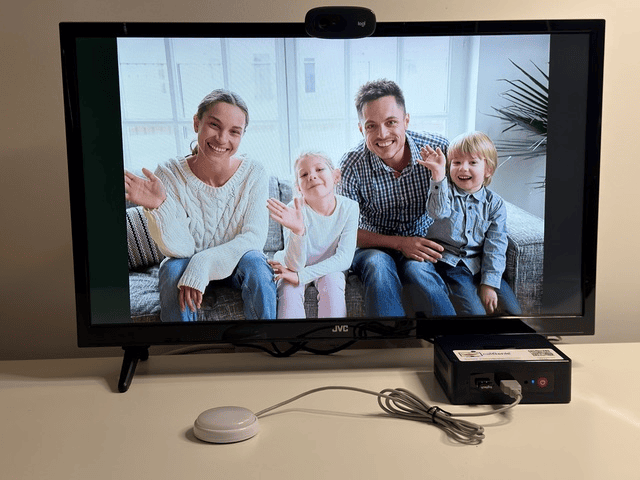
CallGenie helps people stay connected through simple video calls on their TV.
Designed for older adults, disabled users, those with dementia and care settings, it removes many of the barriers that can make smartphones, tablets, and apps difficult to use.
Families, friends, and carers can make video calls using Microsoft Teams, while the person receiving the call simply sees it on their television. They do not need to pick up a device, open an app, remember a password, or press small buttons.
CallGenie can even turn the TV on, select the right input, and return it to its previous state after the call — making face-to-face contact easier, calmer, and more accessible.
Product Reviews

Who is CallGenie For?

CallGenie is for:
-
People who’ve never used or not comfortable using a smartphone
-
People with dementia or cognitive conditions
-
Families who live far apart
-
People with visual or hearing impairments
-
Those with limited mobility or motor skills
-
Anyone who just wants a friendly face without the fuss
Because everyone deserves to feel close, no matter the distance.
How CallGenie Works

Make a Call
Family or friends make a video call to CallGenie using either your smartphone, tablet, or computer using Microsoft Teams. The user can make

Auto Answer on the Television
CallGenie will turn on the television, and switch automatically to the input for the video call. No buttons required.

Enjoy Your Call
Enjoy having your catch up with your loved one on the big screen. When you end the call on your device CallGenie will automatically switch the television back to the previous state, whether the previous channel or back into standby.
If They Want To Call You
CallGenie is built so that receiving a call asks nothing at all. If you'd also like your loved one to be able to call out, you can add a button.
Each button calls one person and carries their name. They plug into the unit behind the television, but it does mean they sit by the television rather than by the chair. That makes this part of CallGenie better suited to someone who can get up and cross the room.
Press one and it calls that person. When the person they've called hangs up, the television goes back to whatever was on before.
Two things worth knowing. The buttons don't beep, so the confirmation is the television coming on. And the name is printed, so it only helps if your loved one can read it. If reading is difficult, for any reason, start with a single button they can find by touch.
Buttons are an optional extra. If you'd rather keep things to receiving calls only, you simply don't add any.

What You Need At Your End
You call from Microsoft Teams on your phone, tablet or computer. That's the only part anyone has to operate, and it's the part you're doing, not them.
If you sign, it's worth thinking about your own camera position. Family members who use BSL usually prop the phone up or work from a laptop, so both hands are free and the signing stays in frame. At their end, you appear at full television size.
Group calls work too, so you can bring a second person into the same call.
CallGenie Products


Why CallGenie?
Connects to the Television
CallGenie connects to the user’s television, typically the largest screen in a person’s home
Real-time Subtitles
Real-time subtitles are built into the software. The size of the text can be configured to suit the needs of the user
Auto-Answering Video Calls
CallGenie automatically turns on the television and selects the right input, even on standby, then returns the televison to its previous state.
Use across all devices
Unlike other devices, you can call a CallGenie using your phone, tablet, or PC – whatever works best for you
No Monthly Fees
Pay once and that’s it. Twelve months of full support and warranty included.
Safe and Secure
Only known contacts can make incoming calls. Just add family and friends to the contacts list to enable them to connect
Contact Us
Ask a question or check your television will be compatible with CallGenie
Phone
+44 (0)1252 918824
Address
45 Fairhaven Avenue, West Mersea, Essex, CO5 8EZ, UK